The results, one series per row
The latency measured here is the delay between a frame appearing on the PC screen and the same frame appearing on the device. It covers capture, compression, network, decompression and display, but not the controller delay.
| Device and setting | Median | Status | Photos | Date | Instrument resolution |
|---|---|---|---|---|---|
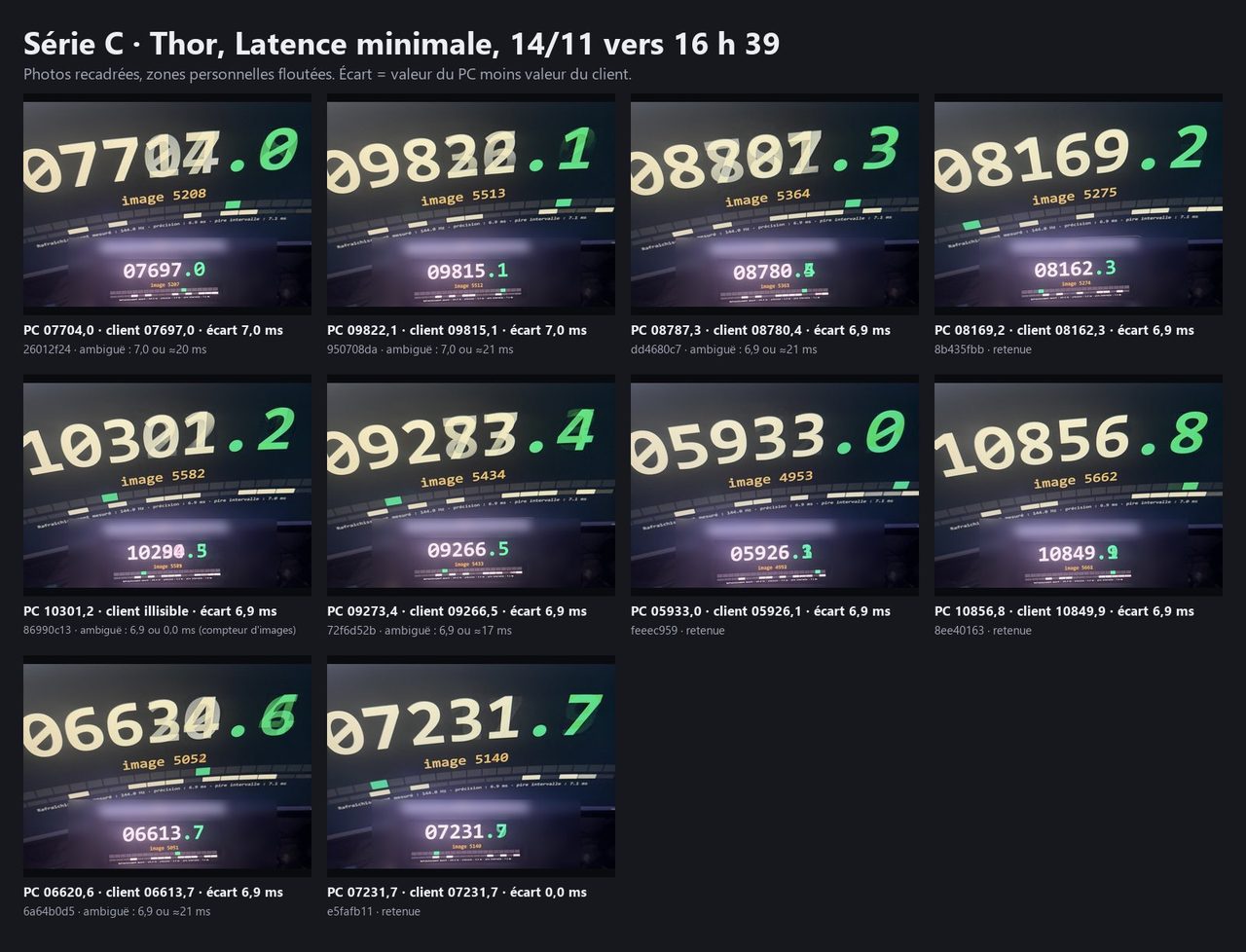
| AYN Thor · Minimum latency | 6.9 ms | Kept | 10 | 14 Nov, around 4:39 pm | 6.9 ms (144 Hz) |
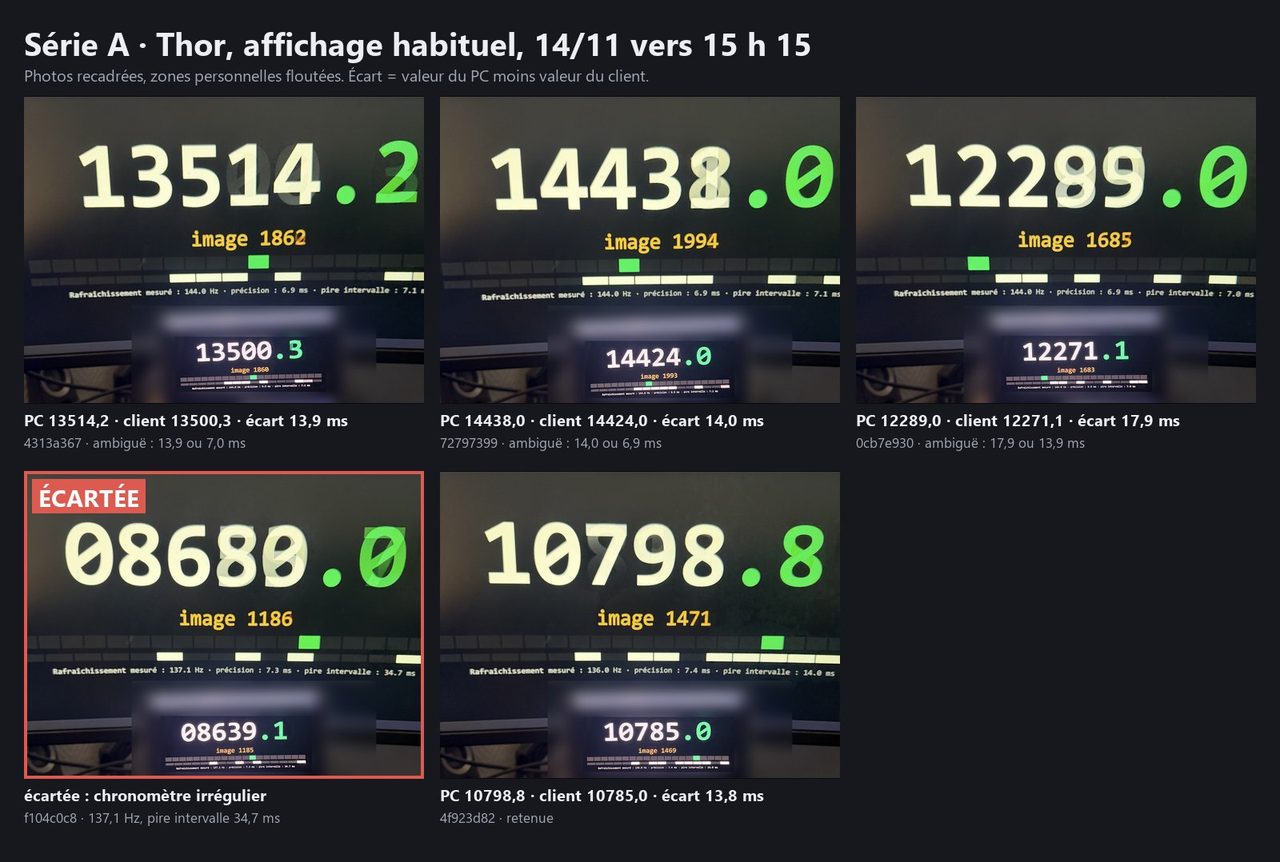
| AYN Thor · direct rendering off | 13.9 ms | Kept, read from the counter | 3 (2 rejected out of 5) | 14 Nov, around 3:15 pm | 6.9 ms (144 Hz) |
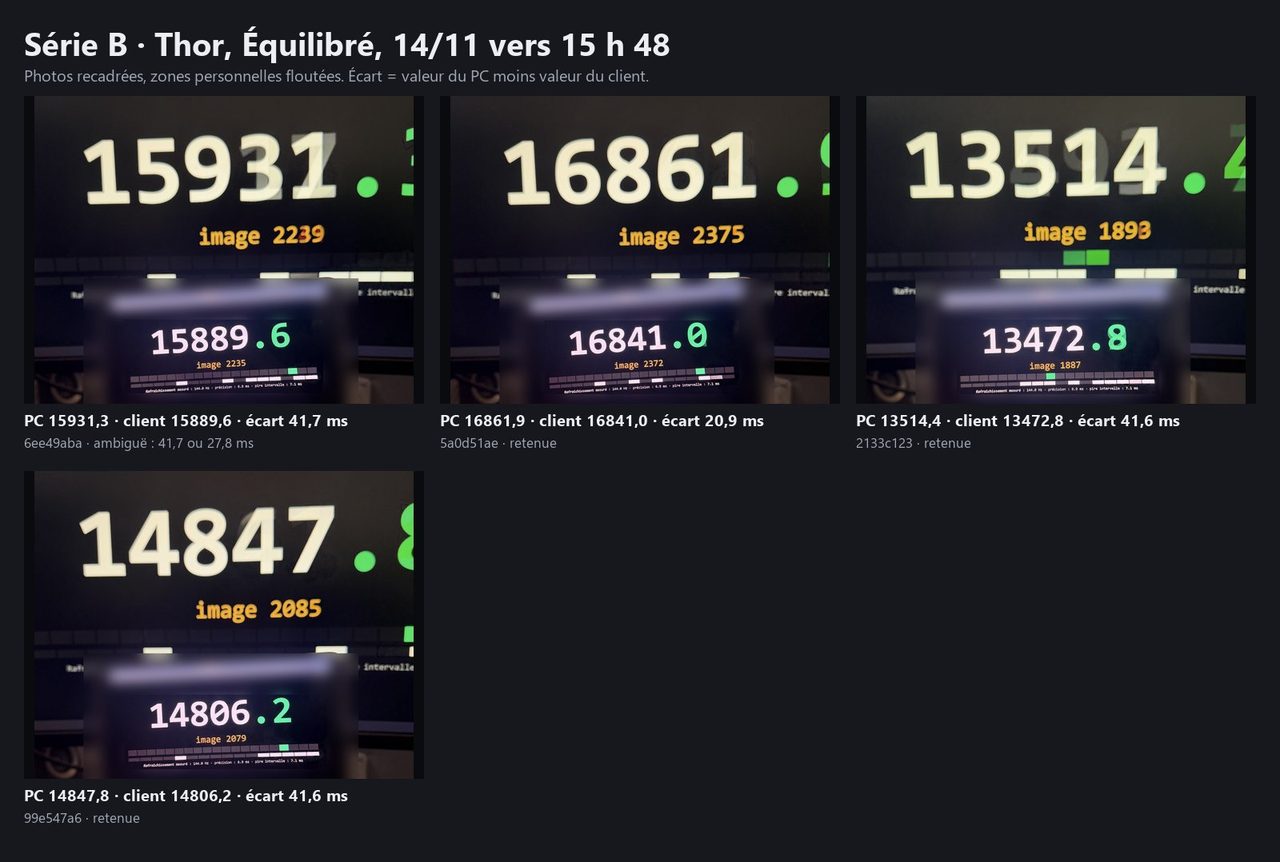
| AYN Thor · Balanced | 34.7 ms | Kept, read from the counter | 4 | 14 Nov, around 3:48 pm | 6.9 ms (144 Hz) |
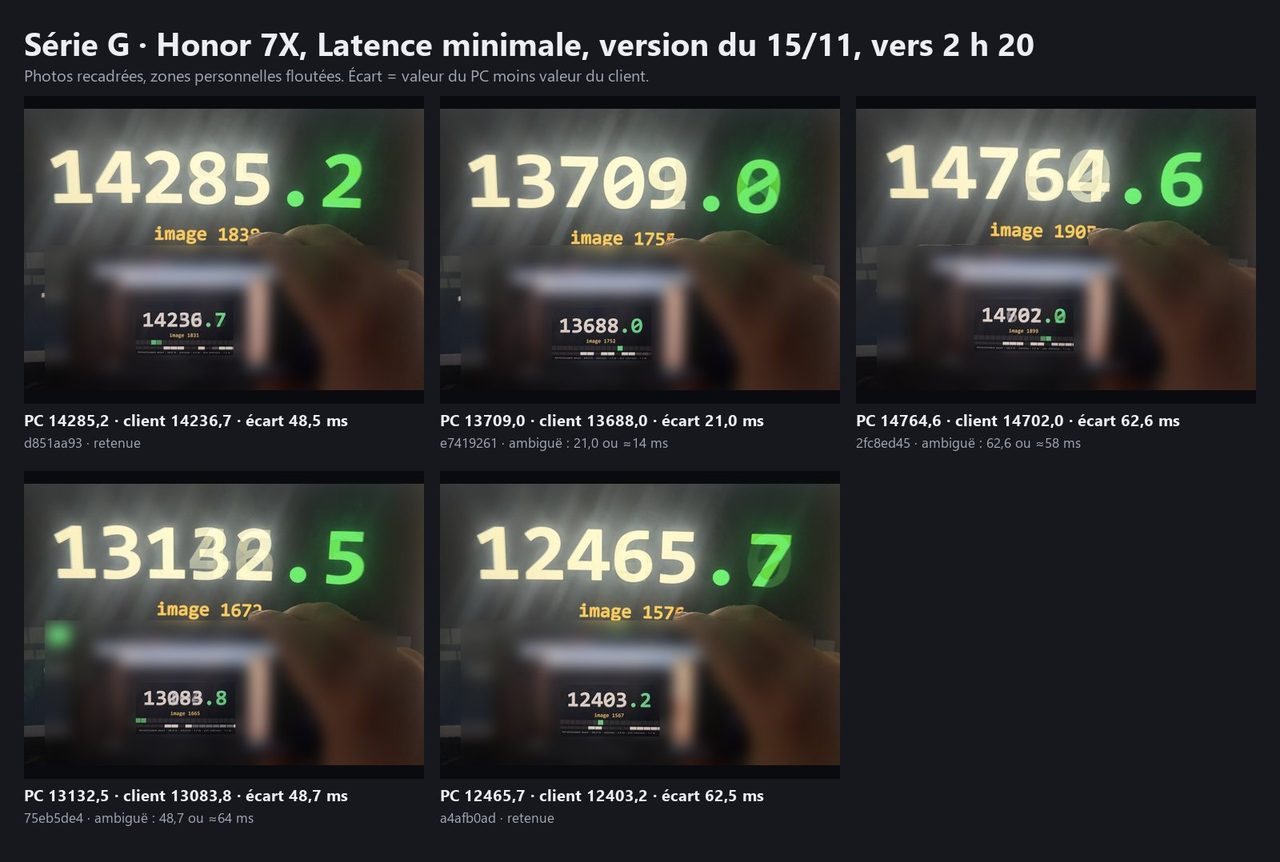
| Honor 7X · Minimum latency | 48.7 ms | Kept, uncertain reading | 5 | 15 Nov, around 2:20 am | 6.9 ms (144 Hz) |
| iPhone 17 Pro Max · app · Minimum latency | ≈ 10 ms | Kept, between one and two frames | 10 | 17 Nov, around 11:04 pm | 6.9 ms (144 Hz) |
| iPhone 17 Pro Max · PWA in Safari | ≈ 40 ms | Kept, comparison on the same iPhone | 9 | 17 Nov, around 11:01 pm | 6.9 ms (144 Hz) |
| iPhone 17 Pro Max · app · Minimum latency · 5G | ≈ 38 ms | Kept, mobile network through the relay, one photo at 75 ms | 10 | 17 Nov, around 11:38 pm | 6.9 ms (144 Hz) |
| Honor 7X · three series | not kept | Rejected | 18 | 14 Nov, 9:55 pm to 10:22 pm | irregular stopwatch (45 to 138 Hz) |
One photo, two screens, one stopwatch
This number comes from a photograph of both screens: I read the displayed times, or their frame counter when digits overlap. Session statistics do not replace this measurement.
- The stopwatchHelio shows a stopwatch page on the PC: a time in milliseconds to one decimal, a counter that moves on every screen refresh, and its own regularity (measured refresh rate, worst interval).
- The photoThe PC screen is streamed to the device. I hold the device in front of the PC screen and photograph both with a phone, in the same frame.
- The readingLatency = time read on the PC minus time read on the device. When the exposure spans two refreshes and digits overlap, I read the gap from the frame counter.
- The sortingA photo is rejected when the stopwatch itself reports a fault during the shot (under 144 Hz measured, or worst interval above 7.1 ms). Rejected photos and their readings are retained; this page does not reproduce every series.
- The summaryI give the median of each series and its number of photos, never the best photo alone.
What this method does not tell
- Instrument floor: a gap smaller than one stopwatch frame cannot be told apart. At 144 Hz one frame lasts 6.9 ms; at 60 Hz, 16.7 ms. Each photo is uncertain by about one frame. When digits overlap, I go by the frame counter, and I also give the digit reading when it differs.
- It is a gap between two screens, not an absolute time: the PC screen has its own display delay, which is not counted.
- A photo is not instantaneous: a phone sensor reads the picture line by line. This progressive readout may bias the measured gap; its direction and magnitude have not been measured.
- The controller delay (from the controller to the PC) and the game’s render time on the PC are not counted.
- Small samples: 3 to 10 kept photos per series, taken early in the session. My goal is at least 20 photos per setting.
- One PC and one home Wi-Fi network, with no control over other connected devices. The numbers hold for the test versions listed.
The PC and the network
The same PC was used for every test.
| Processor | AMD Ryzen 9 7900X3D, 12 cores |
|---|---|
| Graphics card | AMD Radeon RX 7900 XTX, hardware encoding on the graphics card |
| Memory | 64 GB |
| System | Windows 11 Pro (10.0.26100) |
| Stopwatch screen | 3440 x 1440 monitor at 144 Hz |
| Network | Wi-Fi 6 (Realtek 8852BE card), same home network as the device under test, except the 5G series |
| Software on the PC | Helio 0.1.151 (14 Nov and the night of 15 Nov), then 0.1.152 (evening of 15 Nov and 17 Nov), test versions |
AYN Thor: one stopwatch frame with Minimum latency
I measured the AYN Thor Android console with three display settings of the app, on the same afternoon. The requested settings were identical, but the effective network path and the PC state varied between sessions: this is not a perfectly isolated comparison.
| Device | AYN Thor, Android 13, 1920 x 1080 screen at 120 Hz, Qualcomm hardware decoder (HEVC) with its low-latency settings |
|---|---|
| App | Lume Android 0.1.0-20261114-1402 (test version of 14 Nov) |
| PC | Helio 0.1.151 (test version) |
| Stream | HEVC, 1920 x 1080, 60 frames per second, 15 Mbps requested; picture of a 2560 x 1440 virtual display |
| Network | PC and Thor on Wi-Fi on the same home network, direct connection with no relay; median network round trip of 9 ms during the Minimum latency observation period |
| Instrument | stopwatch at 144 Hz, resolution 6.9 ms; handheld photos taken with a phone |
| Setting | Median | Time | Gaps read | Reading |
|---|---|---|---|---|
| Minimum latency | 6.9 ms | around 4:39 pm | 8 photos at one frame (6.9 or 7.0 ms), 1 at one frame or zero (device digits overlapping), 1 at 0.0 ms | One stopwatch frame, its floor: a smaller gap cannot be measured with this instrument. On five photos the PC digits overlap and the frame counter confirms one frame; without the counter, the digit readings would give a median of 6.9 to about 12 ms. The 0.0 ms photo shows the same number on both screens: I keep it, without drawing any conclusion from it. |
| Direct rendering off | 13.9 ms | around 3:15 pm | counter: 13.9; 6.9; 13.9 ms (digits: 13.9; 14.0; 17.9 ms) | About two frames. On the three kept photos digits overlap: the frame counter shows two, one and two frames (median 13.9 ms); the digits give 14.0 ms. Two photos are rejected: one taken at 136 Hz measured (worst interval 14.0 ms), read as 13.8 ms, wrongly marked “retenue” (kept) on the sheet; the other, read as 40.9 or 50.6 ms depending on the overlapping digits, taken with an irregular stopwatch (137 Hz, worst interval 34.7 ms) during a background task on the PC. |
| Balanced | 34.7 ms | around 3:48 pm | counter: 27.8; 20.9; 41.6; 41.6 ms (digits: 41.7 instead of 27.8 for the first) | About five frames from the counter; 41.6 ms from the digit reading. On the first photo the PC digits overlap and the counter shows four frames. This setting can keep up to two frames queued before display, which may contribute to the observed delay. |
Over time
The photos are taken early in the session. For stability, I left each setting running and recorded the session statistics the Thor sends to the PC.
| Setting | Observation period | Decoded frames dropped without rendering (Thor counter) | Picture interruptions | Notes |
|---|---|---|---|---|
| Minimum latency | 40 min (4:34 pm to 5:14 pm) | 0.32% (463 of 144,097) | 8, including one of 1.9 s during Wi-Fi congestion | about 59 render notifications per second, decoding 6.4 ms, buffer 3 ms, median round trip 9 ms, no drift detected in the monitored statistics |
| Balanced | 30 min | about 1.8% (1,891 of 107,667) | 9, including one of 5.2 s during network congestion (bitrate lowered from 15 to 3 Mbps) | no drift detected in the monitored statistics |
| Direct rendering off | early afternoon | 0.53% | 5, from 186 to 260 ms |
Honor 7X: a 2017 phone, about 49 ms
To see what an old device does, I repeated the same measurement on a 2017 Honor 7X. It is clearly slower than the Thor, and I also publish a summary of the series I had to reject.
| Device | Honor 7X (HUAWEI BND-L21), Android 9, 2160 x 1080 screen at 60 Hz, hardware HEVC decoder with no low-latency mode |
|---|---|
| App | Lume Android 0.1.0-20261115-0200 (test version of 15 Nov) |
| PC | Helio 0.1.151 (test version), PC idle |
| Stream | HEVC, 1920 x 1080, 60 frames per second, Minimum latency setting, active for the whole session (2:11 am to 2:23 am) |
| Network | Wi-Fi, same home network as the PC |
| Instrument | stopwatch at 144 Hz (worst interval 7.1 ms), resolution 6.9 ms; 5 valid photos |
Gaps read: 48.5; 21.0; 62.6; 48.7; 62.5 ms. Median: 48.7 ms, about seven stopwatch frames. Three photos have ambiguous readings (overlapping digits, counter partly hidden by my finger): the main readings give 48.7 ms, but the other possible readings give a median from 48.7 to about 62.5 ms. This is therefore an uncertain reading, to be redone.
Why it is slower: the day before, on this phone, the network round trip stayed between 5 and 17 ms and decoding a frame took about 11 ms. Part of the delay is not yet measured stage by stage, including after decoding; and these figures come from the day before, not from this series.
Rejected series: the evening before, three series (18 photos, medians read from 76 to 110 ms) were taken while the PC stopwatch ran between 45 and 138 Hz, the PC being under load, and the Minimum latency setting had switched itself off after three minutes. I do not compare them with the 15 Nov series: two things changed at once (setting kept on, PC idle).
iPhone 17 Pro Max: with the app, about 10 ms on Wi-Fi and 38 ms on 5G; about 40 ms in Safari
I measured the iPhone again with the 144 Hz stopwatch: in the app with Minimum latency, on Wi-Fi then on 5G, and, a few minutes earlier, in the Lume PWA opened in Safari. Same iPhone, same PC, the same evening.
| Device | iPhone 17 Pro Max, 120 Hz screen (8.3 ms per refresh); iOS version not recorded |
|---|---|
| App | Lume iPhone 1.0.0, Minimum latency setting, in control mode |
| Browser | Lume PWA in Safari, default setting (receive buffer target of 0 ms), in viewer mode |
| PC | Helio 0.1.152 (test version) |
| Stream | HEVC, 1920 x 804 (PC screen at 3440 x 1440); 120 frames per second for the app, 60 for the PWA (Safari reports a 60 Hz screen) |
| Network | home Wi-Fi, direct connection on the local network, network round trip mostly 5 to 10 ms, no packet lost |
| Mobile network (5G) | iPhone Wi-Fi turned off; connection through the Lume relay (TURN, UDP), no virtual private network address in the session; network round trip of 32 to 46 ms, no video loss recorded, one interruption of 0.3 s; bitrate limited to 8 Mbps on this path |
| Instrument | stopwatch at 144 Hz, resolution 6.9 ms; 10 photos per series for the app (Wi-Fi and 5G), 9 for the PWA |
| Client | Median | Time | Gaps read (in frames, from the counter) | Reading |
|---|---|---|---|---|
| App, Minimum latency | ≈ 10 ms | around 11:04 pm | 1 to 2; 2; 1 to 3; 1 to 3; 1; 2; 0 to 2; 1; 2 to 3; 1 | Between one and two stopwatch frames: median 6.9 ms from the frame counter, 13.9 ms from the digit reading. The three sharpest photos give 13.9, 6.9 and 6.9 ms. That is in the range of one to two refreshes of the iPhone screen itself (8.3 ms at 120 Hz). |
| App, Minimum latency, 5G | ≈ 38 ms | around 11:38 pm | 6 to 7; 4 to 5; 6 to 7; 4 to 5; 4 to 5; 5 to 6; 10 to 11; 5 to 6; 4 to 5; 5 to 6 | Five to six frames: median of about 38 ms. Without photo 7, the gaps range from about 28 to 49 ms; photo 7 reaches about 75 ms (10 to 11 frames), an isolated peak that I keep. |
| PWA in Safari | ≈ 40 ms | around 11:01 pm | 4 to 5; 5 to 6; 3 to 4; 5 to 6; 4 to 5; 5 to 6; 4 to 5; 5 to 6; 5 to 6 | Five to six frames: median of 34.7 to 41.7 ms from the frame counter, 38 to 45 ms from the digit reading. |
What this shows: on the same iPhone, the same evening and the same network, the app is about one to two stopwatch frames behind the PC and the PWA in Safari about five to six. The two sessions do not differ only by the client: the PWA received 60 frames per second against 120 for the app, and one frame at 60 frames per second lasts 16.7 ms. The share of each stage in Safari (reception, decoding, display) is not measured.
On 5G: the stream leaves the home router, goes across the internet, the Lume relay and the operator network, then reaches the iPhone. That is the path of a game away from home when a direct connection cannot be set up. The iPhone sat next to the PC only so both screens could be photographed together. On the same iPhone, the same night: about 10 ms on Wi-Fi, about 38 ms on 5G. Elsewhere, 5G coverage and distance can change this figure; that is not measured.
Reading: the PC screen shows two or three overlapping frames on each photo, hence a range. On several photos the PC digits give one more frame than the counter (two on one PWA photo): I give both readings. Three photos (two of the app, one of the PWA) show a worst interval of 7.2 ms, a tenth above my sorting threshold, with no skipped frame (that would be about 13.9 ms): I keep them and say so. Each series was taken in a burst early in the session; the app session lasted less than a minute.
Previous measurement, on 15 Nov: app with Minimum latency, stopwatch at 60 Hz, 10 photos, median of one frame (16.7 ms), at the floor of that instrument, so indicative. Over the 13 min 41 s monitored right after: 99.7% of picture changes seen, no video packet lost, one interruption of 0.2 s.
I have no anonymized photo sheet for these series: only a summary of the readings is published here.
Comparison with Moonlight, on the same console and on the same iPhone
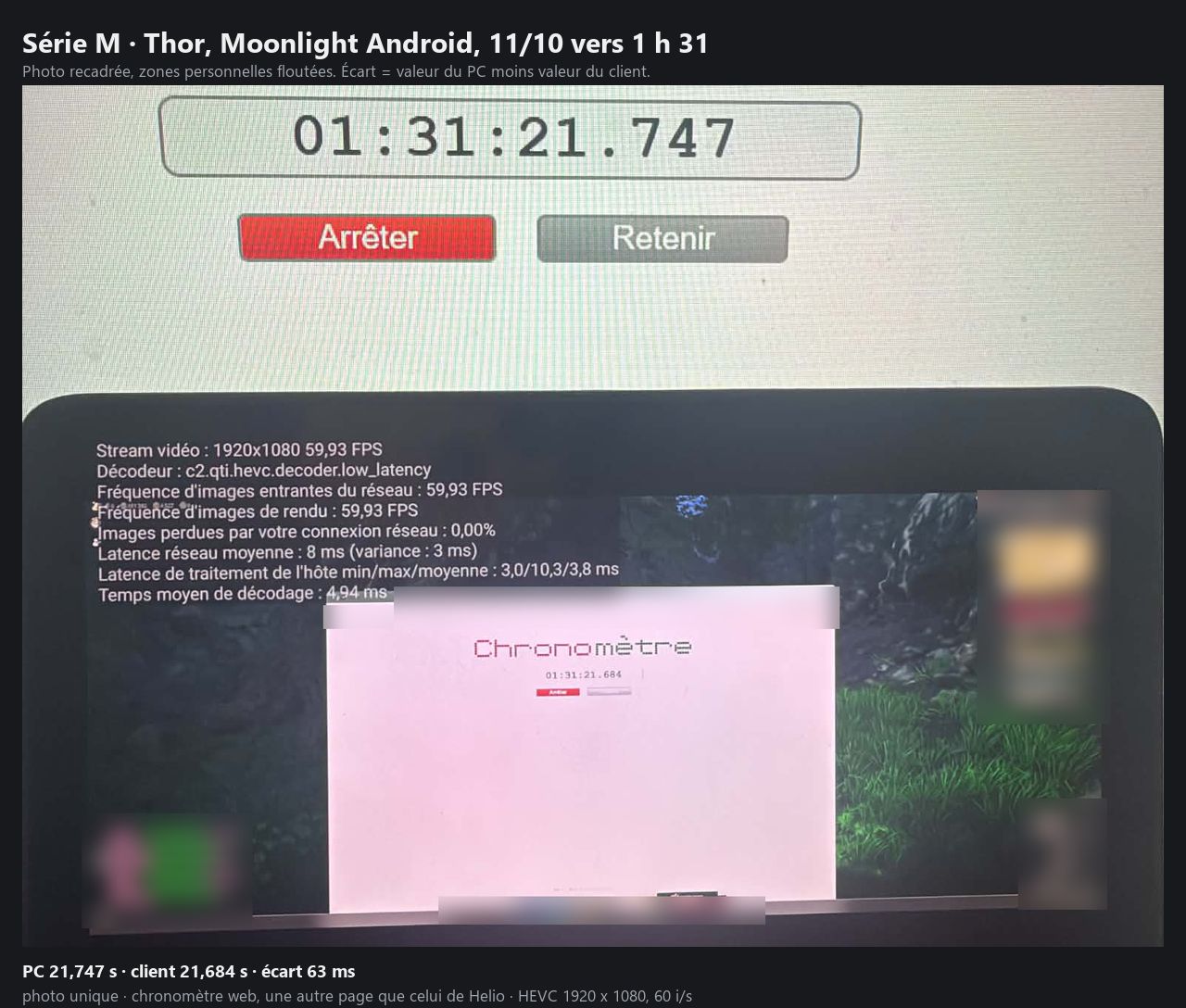
On 11 October 2026, I measured Moonlight on the same AYN Thor, and on 17 and 18 November on the same iPhone 17 Pro Max, with the same PC and the same method: one photo of both screens in the same frame. For Moonlight, the PC ran Sunshine on 11 October and 17 November, then Apollo on 18 November. Moonlight is the only other client compared with Lume on this page; no other comparison is published.
| Software | Date | Settings | Result | Photos |
|---|---|---|---|---|
| Moonlight Android, with Sunshine 2026.914 on the PC | 11 Oct, around 1:31 am | HEVC, 1920 x 1080, 60 frames per second, 15 Mbit/s | 63 ms | one photo only |
| Lume, 11 October version, before its fixes | 11 Oct, around 3:08 am | HEVC, 1920 x 804, 60 frames per second | 64 ms | value read on the spot, photo not kept |
| Lume, Minimum latency, 14 November test version | 14 Nov, around 4:39 pm | HEVC, 1920 x 1080, 60 frames per second, 15 Mbit/s | 6.9 ms (median) | 10 photos, at the stopwatch floor |
On my console, nothing I have tested does better.
Limits: on the Thor, Moonlight was measured only once, on a single photo, a month earlier, with the Sunshine version shown; the PC stopwatch was then a web page, not the 144 Hz Helio stopwatch. On 11 October, Lume measured 64 ms in similar conditions (same console, same PC, same method, 1920 x 804 picture), before the fixes that followed. A new side-by-side test, on the same day and with the same stopwatch, is planned.
On the iPhone 17 Pro Max, 17 and 18 November
| Client | Date and time | Settings | Median | Photos |
|---|---|---|---|---|
| Lume app, Minimum latency | 17 Nov, around 11:04 pm | HEVC, 1920 x 804, 120 frames per second, 12 Mbit/s | ≈ 10 ms | 10 |
| Moonlight iOS, with Sunshine 2026.914 on the PC | 17 Nov, around 11:57 pm | HEVC, 1080p, 120 frames per second, 15 Mbit/s, Frame Pacing “Lowest Latency” | ≈ 24 ms | 10 |
| Moonlight iOS, with Apollo 0.4.6 on the PC | 18 Nov, around 11:25 pm | HEVC, 1080p, 120 frames per second, 15 Mbit/s, Frame Pacing assumed to remain on “Lowest Latency” | ≈ 55 ms | 10 |
| Lume PWA in Safari | 17 Nov, around 11:01 pm | HEVC, 1920 x 804, 60 frames per second | ≈ 40 ms | 9 |
On my iPhone, nothing I have tested does better.
Limits: 10 photos per series (9 for the PWA); Lume at 1920 x 804 against Moonlight at 1080p; a 144 Hz stopwatch, so about one frame (6.9 ms) of uncertainty per photo; for the Sunshine series, Moonlight with the settings I chose for its lowest latency. The 17 Nov series: same iPhone, same PC, same Wi-Fi, the same evening. Gaps read for Moonlight with Sunshine, in stopwatch frames: 2 to 4; 2 to 4; 3 to 4; 2 to 4; 3 to 4; 3 to 4; 3 to 5; 3 to 5; 4 to 5; 4 to 5, median of about 3.5 frames.
Series with Apollo, on 18 Nov: Apollo 0.4.6, its latest stable release (published on 13 July 2025), installed from its official page, with Sunshine stopped during the test. Same iPhone, same PC, same Wi-Fi and same stopwatch as the day before; according to the Apollo log, the same stream conditions as the Sunshine series: 1080p, 120 frames per second, HEVC through the AMF encoder, 15 Mbit/s. Gaps read from the frame counter: 8; 6; 7; 7; 8; 7; 8; 8; 8; 8, median of 8 frames, that is about 55 ms (42 to 56 ms). Limits: a single series of 10 photos, taken the day after the others; reading to within one frame; Moonlight’s Frame Pacing setting was not checked again for this series; the cause of the gap with the Sunshine series is not measured.
To show the effect of settings, not as the comparison: with Moonlight’s default settings on the iPhone (720p, 60 frames per second, 10 Mbit/s, automatic codec, “Lowest Latency”), a series of 10 photos gives about 6 frames, that is about 42 to 45 ms.
What is not right yet
- The Balanced setting is slower than the other two: about five frames against one to two on the Thor. I need to fix it before recommending it.
- Old devices remain slow: about 49 ms on the Honor 7X (uncertain reading, possible median up to about 62.5 ms), and part of that delay is not yet measured stage by stage.
- Picture interruptions were recorded: on the Thor, about one every 3 to 5 minutes, most around 0.2 s. The two longest (1.9 s and 5.2 s) coincide with network congestion; the cause of the others is not established.
- On Android 9 (Honor 7X), the 14 Nov version switched Minimum latency off after three minutes; the 15 Nov version kept it on for the whole session.
- Mobile data: a single 5G series with the 144 Hz stopwatch (17 Nov), through the Lume relay, with one photo at about 75 ms; the direct path on 5G is not measured yet. The first 5G test, on 15 Nov, used the stopwatch at 60 Hz and is not published.
Measurements to come
None of this is measured yet. What I plan: use the same method and document each test’s conditions, whatever the result.
- Thor: at least 20 photos per setting, at the start, middle and end of a session.
- iPhone 17 Pro Max: the app’s two other display settings with the 144 Hz stopwatch, and longer series.
- Mobile data (5G): a stopwatch series with a direct connection, without the relay, and, during a real game away from home, a record of the session indicators (network round trip, lost frames, stability), on iPhone and on Android.
- Thor and PC connected by Ethernet cable.
- A 120 frames per second stream on the Thor’s 120 Hz screen.
- Other devices: a Samsung Galaxy phone, the Apple TV, a TV (in 4K if possible).
- Web browser on PC, and a longer series in Safari on iPhone.
- Controller delay, from the controller to the PC, with a suitable instrument.
- Moonlight and Lume side by side on the Thor, on the same day, with the same stopwatch.
A question about a measurement?
Does a value look wrong, or is a condition missing? Write to me: I keep the photos and logs of every series.